LinkedIn
 Twitter
 Facebook
 Youtube



A dispatcher at a mid-size appliance distributor handles 90 shipments a week. She knows every carrier by name, remembers which ones run late on the Friday Chicago–Columbus lane, and keeps a spreadsheet only she fully understands. Seven years in the seat, and the freight department runs on her memory instead of on the structure of a Transportation Management System.
Then she leaves.
Her replacement spends the first three months piecing carrier relationships back together from old email threads. A rate increase buried in a contract renewal gets missed. Two separate LTL loads go out on a lane that should have been one consolidated FTL. By the time the operations director notices the freight variance, $40,000 has walked out the door in six weeks.
That’s what happens when the operational knowledge of a freight department lives in one person’s head rather than in a system. A TMS is what holds that knowledge in a structured form — and how well it does the job comes down to which modules are in it and how they connect.
Where the TMS Ends and the ERP, WMS, and OMS Begin
A transportation management system covers the span from an incoming order to a paid carrier invoice — planning loads, picking carriers, dispatching freight, tracking shipments, generating documents, auditing invoices against contracted rates. Each of those steps is a module, and the actual set a company runs is what defines what the system can do.
Three adjacent systems get confused for it on a regular basis:
- A WMS controls goods movement inside the warehouse — receiving, putaway, pick-and-pack. The TMS picks up at the dock door, between locations.
- An ERP is the system of record for accounting, inventory, and financial transactions. The TMS reads from it operationally to plan shipments, and posts freight costs back into it.
- An OMS owns the customer order. The TMS takes those orders as input and turns them into freight movements.
So the TMS sits in the middle — between the order and the delivery. Whether it actually runs the operation or just records what happened comes down to two things: how completely it covers that span, and how tightly it integrates with the ERP, WMS, and carrier systems on either side.
For a wider read on how a TMS operates end to end (including deployment options and how to evaluate one), see What Is a Transportation Management System and How Does It Work.
Why TMS Structure Varies Across Companies
No two logistics operations end up with the same module set, and the reason isn’t preference — it’s role. Shipper, carrier, 3PL, multimodal enterprise: each one interacts with freight differently from the first step onward. The CSCMP Supply Chain Management Definitions treat these as distinct categories for that reason.
| Company type | Primary TMS focus |
|---|---|
| Shipper (manufacturer, retailer) | Order management, carrier selection, freight audit |
| Carrier / trucking company | Dispatch, load planning, driver management, real-time tracking |
| 3PL / freight broker | Multi-client visibility, carrier network, quoting and margin management |
| Enterprise (multimodal) | Full module stack plus cross-border, customs, and analytics |
A mid-size shipper running domestic LTL gets the most leverage from strong rate management and freight audit. For a 3PL the priorities flip toward carrier scorecards and client-level cost allocation. A regional trucking company that owns its fleet cares about dispatch and driver workflows far more than a rate shopping engine — the rate negotiation sits upstream of them.
Most SaaS TMS products are built around one of these profiles, which works fine for operations that match the profile. Companies whose model cuts across two — or that carry specific compliance, cargo, or integration requirements — tend to find a SaaS system approximates the workflow rather than running it.
Core TMS Modules: What Each One Does
| Module | Status | Function |
|---|---|---|
| Order and Shipment Management | Required | Converts incoming orders into structured shipment records; foundation for all other modules |
| Rate Management and Freight Quoting | Required — shippers and 3PLs | Stores contracted rates, compares carrier options by cost and transit time at booking |
| Carrier Management | Required — shippers and 3PLs | Maintains carrier registry with contracts, compliance records, and performance history |
| Route Planning and Optimization | Required — fleet operators and carriers | Sequences multi-stop deliveries against time windows, capacity, driver hours, and road limits |
| Dispatch and Load Planning | Required | Consolidates shipments into loads, assigns vehicles, issues load tenders to carriers |
| Tracking and Visibility | Required | Provides real-time shipment status via GPS, ELD, or EDI 214 carrier updates |
| Document Management | Required | Generates and stores BOL, POD, CMR, customs documents throughout the shipment lifecycle |
| Freight Audit and Billing | Required — multi-carrier operations | Compares carrier invoices against contracted rates and flags discrepancies before payment |
| Customer and Partner Portals | Optional | Self-service shipment status and document access for customers and carrier partners |
| Reporting and Analytics | Optional — recommended | Surfaces KPIs, carrier scorecards, lane costs, and trends from historical shipment data |
| Integration Layer | Required | API and EDI connections to ERP, WMS, OMS, carrier systems, and telematics platforms |
| AI Prompt Handler | Optional — emerging | Translates natural language queries into structured data requests across all modules |
Order and Shipment Management
Required — foundation of the module stack; every other module reads from it
Orders arrive from an ERP, an OMS, or as manual entry at the dispatch desk. Each one becomes a shipment record carrying origin, destination, cargo type, weight, dimensions, delivery window, temperature requirements, and hazmat flags. Rate lookups, load building, BOL generation, and status tracking all read from that record later.
Skip the module and the same fields get re-keyed at every step, or pulled from whoever still remembers the details.
- Data handled: order ID, origin and destination, cargo type, weight and dimensions, delivery window, temperature requirements, hazmat classification
- Connects to: Rate Management, Dispatch, Document Management, Tracking
- Primary users: Logistics coordinator, dispatcher, customer service
Rate Management and Freight Quoting
Required for shippers and 3PLs; less critical for carriers operating on fixed internal rates
Without this module, getting a rate at booking means calling or emailing three to five carriers and waiting on responses. That is 30 to 90 minutes per shipment, assuming everyone gets back to you.
The module stores contracted rates and compares options automatically against cost, transit time, and service level for every carrier covering the lane, cargo type, and delivery window. Regular lanes go through contract rates. Spot rates, sourced through load boards or direct outreach, fill in for non-standard lanes and last-minute capacity. Each selection writes back to the record: what options were available, which one got picked, and on what basis.
The stakes shift for a 3PL. A rate quoted from an outdated contract on a large load puts the shipment in the red before the carrier even confirms.
- Data handled: contracted rates by carrier and lane, spot quotes, fuel surcharge tables, accessorial fee schedules, transit time benchmarks
- Connects to: Order Management (shipment specs), Carrier Management (approved carrier pool), Dispatch (confirmed rate on load tender), Freight Audit (rate reference for invoice comparison)
- Primary users: Dispatcher, freight coordinator, operations manager, 3PL account manager
Carrier Management
Required for shippers and 3PLs; not applicable for carriers managing only their own fleet
Every approved carrier in one place, with contracts, insurance certificates, safety compliance records, performance history, lane coverage, and equipment types attached to each one.
When the dispatcher picks a carrier for a load, the system filters against the criteria that decide the load: cargo type, route, compliance status, on-time record. Operations that skip this step run carrier decisions on personal relationships and institutional memory, which holds up right until the dispatcher leaves and the knowledge walks out the door. The replacement either rebuilds from scratch or leans on whoever has been around longest and still picks up the phone.
- Data handled: carrier contracts, insurance and safety certificates, on-time performance history, lane coverage, equipment types, compliance status
- Connects to: Rate Management (approved carrier pool), Dispatch (carrier assignment), Freight Audit (contract terms for dispute resolution), Reporting (carrier scorecards)
- Primary users: Carrier relations manager, dispatcher, compliance officer
Route Planning and Optimization
Optional for asset-light shippers using contracted carriers; required for fleet operators and carriers managing their own vehicles
The module builds delivery sequences against the real-world constraints — time windows, vehicle capacity, driver hours of service, axle weight limits, road restrictions. Static planning produces the next day’s schedule in advance. Dynamic optimization re-sequences in real time as delays, cancellations, or added pickups change what’s possible during the day.
A consumer navigation app finds the fastest path between two points; route planning in a TMS is a different problem. It fits a whole day’s schedule against all of those constraints at once, across multiple vehicles. Past 20 or so stops per day, doing it manually stops being viable.
Underneath, the calculations run on a mapping engine. Google Maps Routes API is the default many teams reach for, but per-request pricing adds up quickly at the scale of a fleet generating thousands of route requests a day. TomTom, Mapbox, and HERE offer comparable routing at lower rates. Self-hosted options like OSRM or Valhalla (both built on OpenStreetMap) take per-request cost off the table entirely, at the price of running the infrastructure.
- Data handled: delivery addresses and time windows, vehicle capacity, driver hours of service, weight and axle limits, road restrictions
- Connects to: Order Management (delivery requirements), Dispatch (planned route and stop sequence), Tracking (planned vs actual route deviation)
- Primary users: Route planner, dispatcher, fleet manager
Dispatch and Load Planning
Required
Dispatch is where shipments heading the same direction get combined into consolidated loads, vehicles get assigned, and the carrier receives the load tender. Two Chicago–Columbus shipments moving separately as LTL almost always cost more than one FTL load combining both — the module is what surfaces that consolidation opportunity before anything actually leaves the dock. Carrier assignment pulls from Carrier Management, stop sequencing from Route Planning.
- Data handled: consolidated load records, vehicle and driver assignments, EDI 204 load tenders, carrier pickup confirmations, departure schedules
- Connects to: Order Management (source shipments), Carrier Management (carrier assignment), Route Planning (stop sequence), Document Management (BOL generation trigger), Tracking (activates shipment monitoring)
- Primary users: Dispatcher, load planner, operations manager
Tracking and Visibility
Required
Real-time shipment status sourced from GPS telematics, carrier EDI 214 updates, or direct API integrations — usually a mix, depending on which carriers are involved.
The split between passive and active tracking matters more than it sounds. Passive tracking is the carrier updating status manually, when they get to it, in whatever format their dispatcher decides. Active tracking pulls GPS positions from ELD devices on a fixed interval. On a normal day the difference is invisible. It becomes visible the moment a shipment runs two hours late and a customer wants an ETA: with passive tracking the answer needs a phone call and a wait for callback, while active tracking already has the location on screen — and the exception was usually flagged before anyone asked.
- Data handled: GPS coordinates, ELD telemetry, EDI 214 status events, API carrier feeds, milestone timestamps, ETA recalculations
- Connects to: Dispatch (shipment reference), Document Management (POD upload trigger at delivery), Customer Portals (live status feed), Reporting (on-time performance data), Freight Audit (delivery confirmation)
- Primary users: Dispatcher (exception management), customer service (ETA queries), operations manager
Document Management
Required — BOL is a legal requirement in most jurisdictions; missing POD blocks invoicing
Generation and storage of every document a shipment touches — BOL, POD, CMR, customs paperwork, carrier contracts.
This module sits in the background until something goes wrong. Then a POD goes missing and an invoice sits unpaid for two weeks while AP and dispatch chase the carrier for confirmation. Or a cross-border load stops at customs because a certificate of origin was never attached to the shipment. Documents that generate automatically from the shipment record don’t get lost, don’t end up in version conflicts, and don’t depend on someone remembering to file them.
- Data handled: BOL, POD, CMR, customs declarations, certificates of origin, packing lists, carrier contracts
- Connects to: Order Management (BOL source data), Dispatch (document delivery to driver), Tracking (POD upload at delivery), Freight Audit (documentation for dispute resolution), Customer Portals (POD retrieval)
- Primary users: Dispatcher, billing team, customs broker, customer service
Freight Audit and Billing
Required for any operation with multiple carriers and variable rates; billing errors typically run 3–8% of freight spend without it
Automated comparison of carrier invoices against contracted rates and the actual shipment data. If a carrier invoices for a weight that doesn’t match the original shipment, bills a fuel surcharge that wasn’t in the contract, or piles on accessorial charges that weren’t authorized, the system flags the discrepancy before the invoice gets approved.
The scale of this problem is documented enough to see patterns in the numbers. Freight payment processors that audit carrier invoices at volume — Cass Information Systems being among the largest in North America — report billing discrepancies running 3–8% of total freight spend for operations without systematic audit, driven by carrier entry errors, mismatches against expired rate contracts, and accessorials applied without prior authorization.
For a company spending $5M a year on freight, that’s $150K to $400K annually on the line. Automated freight audit catches these consistently. Manual reconciliation in Excel catches a fraction of them, unevenly.
- Data handled: carrier invoices (EDI 210), contracted rates, accessorial and surcharge charges, shipment weight verification records, payment approval status
- Connects to: Rate Management (contracted rate reference), Order Management (original shipment data), Document Management (delivery confirmation), Reporting (freight spend analytics), ERP (invoice posting)
- Primary users: Billing team, finance manager, accounts payable
Customer and Partner Portals
Optional — standard expectation for 3PLs; high value for shippers with significant customer service volume
Self-service access for the two groups that otherwise call customer service all day: customers checking shipment status and pulling PODs, and carrier partners confirming pickups, uploading documents, and posting status updates.
The operational effect on the team is direct — fewer inbound calls asking “where is my shipment?”, so customer service spends its time on actual problems rather than status lookups. For 3PLs a client-facing portal isn’t really a differentiator anymore; it’s usually a contractual expectation.
- Data handled: shipment status feeds, POD documents, delivery history, carrier pickup confirmations, uploaded carrier documents
- Connects to: Tracking (live status), Document Management (POD retrieval), Order Management (shipment details), Reporting (account-level performance data for 3PLs)
- Primary users: External customers (self-service status), carrier partners (document upload and pickup confirmation), account manager
Reporting and Analytics
Optional — recommended from day one; becomes critical once the operation has enough data to act on
Most freight teams know their total freight spend. Fewer can pull cost per lane, on-time rate by carrier, or a list of routes that routinely miss delivery windows — that data only exists if the TMS is the one capturing and surfacing it.
The dashboards split along two timeframes. Operational views show what’s happening today: open shipments, active exceptions, pending invoices. Strategic analytics look back over the last six months — lanes drifting more expensive, carriers whose on-time rate is sliding, consolidation patterns the team keeps walking past. Without this layer, carrier contract negotiations and lane strategy decisions get made on intuition rather than numbers.
- Data handled: historical shipment records, freight spend by lane and carrier, on-time delivery rates, carrier performance scores, exception logs, cost-per-shipment trends
- Connects to: all modules (aggregates data across the full shipment lifecycle)
- Primary users: Operations director, finance, account managers (3PL), carrier relations manager
Integration Layer
Required — a TMS without live connections to ERP, WMS, and carrier systems just duplicates data entry from other places
API and EDI connections out to ERP, WMS, OMS, carrier systems, telematics platforms, and customs portals.
Strictly speaking this isn’t a feature module — it’s the plumbing every other module runs on. A TMS that can’t reach the ERP can’t post freight costs to the correct cost center. One that can’t reach the WMS can’t confirm whether the warehouse is actually ready to load before tendering. The EDI standards that come up most in transportation are 204 (load tender to carrier), 210 (carrier freight invoice), and 214 (shipment status update), all maintained by the ASC X12 standards body. When those connections aren’t there, data moves between systems by hand — and manual re-entry quietly reintroduces every error the TMS was supposed to remove.
- Data handled: API payloads, EDI transaction sets (204, 210, 214), webhook events, data mapping and transformation rules, authentication tokens
- Connects to: all modules — bridges internal TMS data with ERP, WMS, OMS, carrier platforms, and telematics systems
- Primary users: IT and integration team (configuration and maintenance); transparent to end users in daily operation
AI Prompt Handler
Optional — emerging standard; particularly valuable for operations teams that need fast answers without navigating dashboards
Most TMS interfaces are still built around forms, filters, and dashboards. Getting an answer means knowing which screen to open, which filter to apply, and which report to export. That works fine for the dispatcher who lives in the system — it’s slow even for them, and it falls apart for everyone else.
An AI prompt handler sits as a layer over the existing module stack. It translates natural language queries into structured data requests across the underlying modules in real time. The data itself doesn’t move — shipment records, tracking feeds, driver assignments, exception logs all stay where they are; the prompt handler just provides a conversational interface into all of it.
A few examples of what teams typically ask:
- “Show me all orders shipping to New Jersey this week” — queries Order Management with a destination and delivery-window filter, returns the list without opening a single screen
- “What orders have problems this week?” — cross-references Tracking exceptions, missed windows from Dispatch, and discrepancies flagged by Freight Audit into one consolidated view
- “Where is driver Bill Peterson right now and how long until his next unload?” — pulls live GPS from Tracking, matches it against the route in Dispatch, and calculates remaining time against the scheduled window
The module can be added to an existing TMS as a separate layer without touching the core; it reads through the Integration Layer like any other consumer. On a new build it tends to be designed in from the start with broader cross-module access — and, where appropriate, write permissions for supported actions like reassigning a carrier or flagging an exception.
The pull comes from the people who don’t live in the TMS all day — operations managers, customer service, occasional users — who want to type a question and get an answer instead of opening three screens to find it.
- Data handled: natural language query input, structured API responses from connected modules, session context for follow-up queries
- Connects to: Order Management, Tracking, Dispatch, Freight Audit, Reporting — read access across modules via Integration Layer
- Primary users: Operations manager, dispatcher, customer service, logistics coordinator
How TMS Modules Work Together: An Operational Flow
The modules don’t run independently — each one hands data to the next, and any gap in the chain becomes somebody’s manual work to bridge.
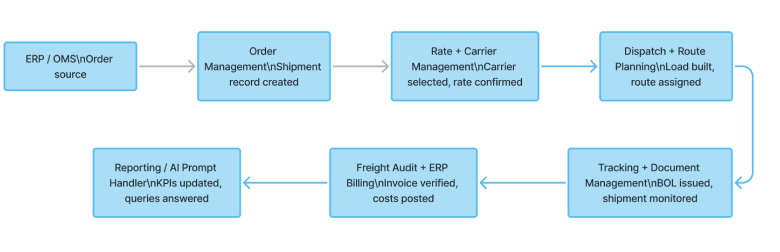
- Order intake — ERP or OMS sends order data to the TMS, which creates a shipment record
- Rate and carrier selection — the system compares available rates and selects a carrier against configured rules (cost, service level, lane preference)
- Load planning — shipments heading the same direction are consolidated; a vehicle and driver are assigned
- Dispatch — the carrier receives an EDI 204 load tender or a portal notification and confirms the pickup
- Documentation — BOL generates from the shipment record; the driver receives documents before departure
- Tracking — GPS updates or EDI 214 status messages flow in; the shipment dashboard reflects current location and ETA
- Delivery confirmation — POD is uploaded by the driver or carrier; the shipment record closes
- Freight audit — the carrier’s EDI 210 invoice arrives; the system compares it against the contracted rate and flags any gaps
- Analytics — the closed shipment contributes to carrier scorecards, lane cost data, and on-time statistics
Pull any one step out of the system and the cost shows up downstream. Rate comparison by phone introduces inconsistency. Status tracked in a spreadsheet means exceptions surface hours later than they should. Invoice reconciliation in Excel catches some discrepancies and misses others. Each gap multiplies the manual work in every step that follows.
The module structure above is also the lens for evaluating any TMS — whether the question is which SaaS to buy or what to scope for a custom build. The interesting question isn’t which modules are present (most decks tick the same boxes), it’s how much of the actual operation those modules can encode: the rate logic, the cargo constraints, the integration depth, the compliance workflows that don’t fit a standard screen.
That gap between what the system supports and what the operation actually needs is what drives the deployment-model decision next.
What to Define Before Building or Evaluating a TMS
Operational context
- Shipment types and cargo: FTL, LTL, parcel, intermodal, cross-border, specialized.
- User roles in scope: dispatcher, carrier manager, billing team, customer service, analytics.
- Volume: shipments per month, number of active carriers, number of client accounts.
Functional requirements
- Which modules are critical to current operations vs. which are future scope.
- Non-standard business rules: custom rate calculation logic, specific compliance workflows, cargo-specific constraints.
- Document types required: BOL, POD, CMR, customs, certificates of origin.
Integrations
- ERP, WMS, OMS: which systems, what data flows in each direction.
- Carrier connectivity: EDI or API, which carrier networks.
- Telematics or GPS providers if active tracking is in scope.
Data and reporting
- KPIs needed for daily operations vs. monthly strategic review.
- Data residency requirements, access controls, retention policies.
TMS evaluations that go straight to vendor demos without working through this list first tend to end one of two ways: the wrong system gets bought, or the right one gets bought and then absorbs six months of configuration work to approximate how the operation actually runs.
How TwinCore Builds Custom TMS Systems
TwinCore designs new transportation management systems from scratch and modernizes existing ones. The logistics portfolio covers 10+ projects for clients in the US, Canada, and Europe — ranging from single-module MVPs to full-stack platforms with multimodal operations, cross-border freight, and multi-client 3PL workflows.
All systems run on Azure, deployed to regional infrastructure that matches each client’s data residency and compliance requirements across North American and European operations.
Module scope follows the actual operation
A TMS shipped with eleven modules where six go unused is mostly overhead, not efficiency. The starting point is always the existing freight process — what runs well today, where the manual gaps sit, and what the operation looks like at two to three times current volume. The system ends up with the modules it actually needs, and an architecture that can add more later without unwinding the core.
That’s the scoping work behind TwinCore’s TMS development services — defining the module set that fits today’s freight process and an architecture that holds up at 3x the volume.
When a custom build doesn’t make sense
For operations handling fewer than 50–100 shipments a month with a fixed carrier set and standard domestic freight, a SaaS TMS is the more practical starting point — and we’ll usually say so directly. The economics of a custom build don’t hold at low volume.
The tradeoff with SaaS is data control. Carrier rates, client contracts, lane performance history, and shipment records all sit on external infrastructure. For most operations that’s an acceptable risk. For those where it isn’t — regulated freight, sensitive client data, compliance obligations — TwinCore encrypts data at the database level on custom builds, so a database compromise returns cipher text rather than readable freight records.
Integration-first architecture
By the time a TMS conversation starts, most companies already run an ERP, a WMS, or both. A new system that can’t reach into the existing stack just creates another manual handoff layer, which cancels most of the value it was supposed to add. TwinCore builds TMS platforms with open integration as the baseline — REST APIs, EDI connectors for 204/210/214 transaction sets, webhook support — so the new system slots in alongside what’s already running.
More on the wider approach under custom logistics software development.
MVP from $25,000
A first usable version of a TMS starts at $25,000. The accelerated timeline is possible because TwinCore maintains a modular logistics software framework — data models, API scaffolding, auth layer, and base UI components refined across previous logistics projects. The custom work goes into business logic and integrations, not into rebuilding infrastructure that’s already proven elsewhere.
If a TMS is already running...
Most logistics software doesn’t break at launch. It starts degrading 12–18 months in, when data volume grows past what the original schema was designed for — slow queries, workarounds accumulating around integration gaps, modules that needed heavy configuration to approximate the workflow in the first place. That’s an architecture problem, not a features problem, and adding features rarely fixes it.
If there’s doubt about the quality of an existing system, the questions worth asking the development partner are concrete: what framework does the system run on, how long does adding a new carrier integration take, what happens to query performance at three times current shipment volume, how easy is it to add a new module without touching the core.
TwinCore runs technical audits against that kind of checklist — an honest read on what’s working, what’s degrading, and what a remediation or rebuild path would involve.
If a current TMS is slow, hard to integrate, or no longer matches the way the operation runs, that audit is usually the right first step.