LinkedIn
 Twitter
 Facebook
 Youtube



Pick errors above 2% with no clear root cause — workers blame the system, the system shows no problem. Stock the system marks as available that nobody can find on the shelf. Shipment status updated by hand at the end of a shift, so carriers and customers are always working from data that is hours old.
When a warehouse runs into all three at once, manual coordination has hit its limit.
A warehouse management system (WMS) controls the operational sequence from receiving to shipping: putaway, replenishment, picking, packing, and inventory accuracy — replacing manual decisions with tracked, rule-based execution.
This guide covers three questions: whether the operation actually needs a WMS, which of the three types fits the workflow, and when building a custom system makes more sense than buying packaged software.
What a WMS Actually Does (and Doesn’t Do)
WMS as a Warehouse Execution System
A WMS controls warehouse processes end to end — from the moment a shipment arrives at receiving to the moment an order leaves shipping.
Receiving starts the control chain. The system checks what arrived against the purchase order, records shortages or damage at the dock, and routes product to the next step.
Putaway determines where each SKU goes — based on velocity, dimensions, handling requirements, or compatibility constraints — and directs the worker there. When putaway runs on memory instead of rules, inventory scatters, travel time grows, and new staff lose time searching on every pick.
Picking converts orders into executable work: assigned routes, sequenced tasks, and item-level checks. Packing is the last catch point before a wrong pick becomes a customer problem — contents verified, label applied, order closed.
At shipping, the WMS hands off to the carrier: outbound orders validated, labels generated, status pushed to downstream systems. Without that handoff, someone closes the loop manually at the end of the shift.
Every step depends on location accuracy. Without bin-level tracking, picking runs on stale data and cycle counts become disputes about what the system shows versus what is on the shelf.
What WMS Is Not
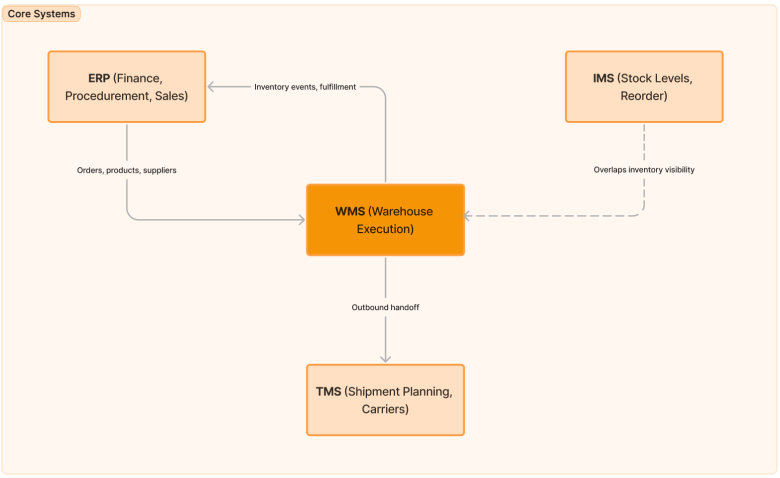
Many teams evaluate WMS software while really talking about ERP, inventory tools, or transportation systems.
| System | Primary job | Where it overlaps with WMS |
|---|---|---|
| WMS | Executes warehouse operations: receiving, putaway, picking, packing, shipping, inventory control | Core system for warehouse work |
| ERP | Manages finance, procurement, sales, manufacturing, and master data | Shares orders, products, suppliers, and financial events |
| IMS | Tracks stock levels and reorder logic | Overlaps on inventory visibility, but usually lacks workflow execution depth |
| TMS | Plans shipments, carrier selection, routing, and freight cost control | Connects at the outbound shipping handoff |
In simple terms: ERP tells the business what should happen, TMS helps move freight, IMS tracks stock, and WMS runs the warehouse itself.
Do You Actually Need a WMS? - Operational Signals That Tell You
Not every warehouse needs one. The cost makes sense only when the current setup is generating errors, delays, or inventory gaps it cannot fix itself.
Signs Your Operations Have Outgrown Manual or Basic Systems
- Pick errors above 1–2% of orders, and nobody can explain why — the process runs on memory, not rules.
- Only experienced workers know where things are stored. New staff slow down, misplace stock, and take weeks to become productive.
- Inventory counts take hours and still end in disagreements between what the system shows and what is on the shelf.
- The system shows stock as available, but workers can’t find it. Nobody knows which exact location it’s in.
- Shipment confirmations are updated manually at the end of the shift — carriers and customers always get stale data.
- Restocking happens when someone notices a shelf is empty, not when the system triggers it.
When You Probably Don’t Need a WMS Yet
- Fewer than 50 product types and fewer than 20 orders per day — a spreadsheet or basic inventory tool is enough.
- One warehouse, one shift, stable product range — no complexity that requires system-level control.
- Your ERP already tracks inventory at current volume without errors or manual fixes — no reason to add another system.
- Team of fewer than five people — direct communication is faster and cheaper than implementing dedicated software.
WMS Readiness Self-Assessment
Use this checklist as a quick decision filter:
| Question | Why it matters |
|---|---|
| Do you process more than 50 orders per day? | Higher order volume increases the cost of manual coordination and errors. |
| Do you manage more than 100 SKUs? | SKU growth makes memory-based location control unreliable. |
| Do you operate more than one warehouse? | Multi-site operations increase visibility and routing complexity. |
| Do inventory discrepancies or picking errors happen monthly? | Recurring errors usually mean process control is missing, not just discipline. |
| Do you integrate with multiple systems such as ERP, e-commerce, or carriers? | More systems create more failure points without structured execution data. |
| Does the warehouse team exceed 10 people? | Larger teams need consistent workflows, not informal coordination. |
| Do seasonal peaks require temporary labor? | Temporary staff expose weak process design very quickly. |
Five or more “yes” answers: a WMS is probably overdue. Mostly “no”: keep the stack simple for now.
Three Types of WMS - And Which Operations They Fit
Most logistics teams are choosing among three models: off-the-shelf WMS, an ERP-embedded option, or a custom warehouse management system built around specific workflows.
Ready-Made (Off-the-Shelf) WMS
A ready-made WMS gives you established workflows, vendor support, and known implementation patterns. It fits warehouses with standard receiving, picking, and shipping flows that do not depend on unusual rules or complex exception logic.
The advantage is speed. You can get to go-live faster, spend less upfront, and rely on vendor updates instead of funding your own roadmap. The tradeoff is fit. When the software cannot model your real exceptions cleanly, the business ends up adapting to the tool.
The strongest signal for this option is simple: your top exception flows can be handled through configuration.
Upgraded ERP-Embedded WMS
Teams running SAP, Oracle, Dynamics, or NetSuite often evaluate the embedded warehouse module before committing to a separate WMS. One platform, one integration layer, no vendor split.
If finance and operations are already standardized on the ERP and the warehouse does not need complex task management or client-specific exception handling, extending the ERP is worth evaluating.
The limitation is depth. ERP warehouse modules handle the basics — receiving, putaway, picking — but struggle once the operation needs finer slotting logic, flexible task sequencing, or heavy customization.
The right signal: the warehouse runs within what the ERP module supports natively, and the team does not want to maintain a separate platform.
Custom WMS
Custom WMS software is justified when the warehouse is a source of complexity the business cannot flatten away. That might mean client-specific 3PL workflows, unusual putaway logic, tightly coupled legacy integrations, or multi-site decision rules that off-the-shelf products only partly support.
The cost is real. Longer timeline, higher upfront investment, and the business is responsible for maintaining and evolving the product after go-live. Off-the-shelf gives you vendor updates; custom means the team funds the roadmap.
The clearest test: take the top five exception flows and check how many need custom code or workarounds in a packaged system. If most do, the cost of maintaining those workarounds long-term usually exceeds the custom build.
Comparison Table
| Criterion | Off-the-Shelf | ERP-Embedded | Custom |
|---|---|---|---|
| Implementation cost | Lowest upfront cost | Moderate, depending on ERP scope | Highest upfront cost |
| Time to go-live | Fastest | Moderate | Slowest |
| Workflow flexibility | Limited to configuration | Limited by ERP architecture | High |
| Integration options | Good for standard APIs | Best inside ERP stack, weaker outside it | Built around your integration landscape |
| Scalability for new workflows | Depends on vendor roadmap | Depends on ERP roadmap | Controlled by your roadmap |
| Best fit warehouse profile | Standard operations | ERP-centric organizations | Complex or differentiated operations |
When Custom WMS Development Is Actually Justified
The question is whether the real operational exceptions can be handled through configuration in a packaged system — or not.
Operational Complexity That Breaks Standard Configurations
Custom development makes sense when the operation genuinely breaks packaged models. A common example is running multiple picking strategies in the same facility: zone picking for fast movers, discrete picking for high-value orders, and batch logic for another product group. Many systems can do each of those in isolation. Fewer handle them cleanly in parallel.
If storage logic depends on SKU attributes, handling requirements, temperature zones, or compatibility constraints, standard putaway configuration becomes brittle.
When packing choices affect freight costs, service commitments, or per-client rules, packaged cartonization logic either locks the operation into fixed configurations or requires manual overrides for every exception.
Multi-client 3PL warehouses are where this compounds fastest. Each client has separate SLA rules, billing structures, reporting requirements, and exception handling. Packaged systems often support multi-client setups partially — leaving enough gaps that the team ends up maintaining manual workarounds alongside the system.
Integration Requirements Beyond Standard APIs
Most real warehouses run a mix of legacy ERPs, home-built tools, and modern platforms — each needing a different connection approach.
A legacy ERP may have no standard API. Real-time sync may need to run across ERP, OMS, e-commerce, and carriers simultaneously. Internal tools built over years rarely map cleanly to a vendor connector.
Automation adds another layer. AMRs, conveyors, ASRS, and RFID each run on vendor-specific protocols with their own timing requirements. When the WMS has to coordinate physical equipment alongside software systems, a packaged connector is rarely enough — the integration needs to be built around the actual hardware behavior.
Scale and Multi-Site Operations
Once operations span three or more warehouses, the question shifts from “does each site work?” to “how do we allocate inventory, tasks, and labor across the network in real time?” That is where most packaged systems hit their ceiling.
Seasonal volume swings stress the system further. When peak periods require rapid staffing increases and dynamic workload redistribution, static rule sets require manual intervention that defeats the purpose of having a system.
International distribution adds compliance, labeling, and regulatory requirements that vary by country. What works as standard configuration for one market becomes a list of per-country exceptions for another.
When Custom WMS Is NOT the Right Answer
If the real problem is simply that you need a WMS at all, start there. Do not jump into custom warehouse management software development before proving that a packaged system cannot handle the job.
If a standard product covers 90 percent or more of real operational flows, building your own platform is usually a poor use of time and budget.
If the budget is below $150K and the target timeline is under six months, the practical answer is usually a SaaS WMS with configuration, not a custom build.
And if no one in the business can own the product after go-live, custom is a risk, not an asset.
Core Modules of a Custom WMS - What Gets Built and Why
Inbound Operations
- Inbound usually starts with receiving, where the system checks what arrived, records condition and quantity, and flags mismatches. From there, putaway logic takes over, assigning inventory to the right location based on business rules. In some warehouses, cross-docking matters too, especially when product should move directly from inbound to outbound without sitting in storage.
Inventory Control
- Inventory control covers bin-level visibility, cycle count planning, stock rotation rules (FIFO, FEFO, LIFO), lot and serial number tracking, expiration monitoring, and transfer requests between zones or sites. Everything else in the WMS reads from this layer — if inventory control is inaccurate, every downstream process works from wrong data.
Outbound Operations
- Picking errors, wrong labels, and missed shipments show up in outbound first. The module covers the full picking-to-ship sequence: executing the right strategy for each order type, validating pack contents before the box closes, and pushing shipping data to carriers without manual steps. This area typically gets the most detailed requirements in a custom build because mistakes here reach the customer.
Labor Management
- Labor modules assign tasks, balance workload across zones, and track pick rates and error counts per worker. That gives supervisors data to act on during a shift — not just a backlog number to look at after it ends.
Integrations and Visibility
- The WMS needs live connections to ERP, OMS, e-commerce channels, and carrier APIs from day one. Reporting is built in alongside: order cycle time, pick accuracy, receiving speed, putaway error rates — available in the system, not extracted manually each time someone asks.
Custom WMS Development Process - How It Actually Works
Custom WMS development works in phases because building the wrong thing early is expensive to undo.

Phase 1: Operations Discovery
The team maps what actually happens on the floor — not the idealized process, but the real one. That means observing warehouse flows, documenting exceptions, listing integrations, and identifying where the current process breaks and why. Skipping or compressing this phase is the most common reason custom WMS projects overshoot budget.
Phase 2: Solution Design
Once the operation is clear, the team designs the system: data model, workflows, integrations, user roles, mobile interactions, and reporting requirements. This is where tradeoffs become visible before code makes them expensive.
Phase 3: Development and Integration
Warehouse workflows get implemented, interfaces built, and integrations connected. At the end of this phase the system handles real operational scenarios, not just test cases on paper.
Phase 4: Staging and Validation
Before go-live, the system has to prove it can handle production-like conditions. That includes real test scenarios, operational validation, user acceptance, exception handling, and performance checks under expected load.
Phase 5: Go-Live and Stabilization
Go-live is when the warehouse starts depending on the system for every shift. Early defect response, workflow adjustments, and adoption monitoring are as operationally critical as the launch itself.
Timeline and Cost Expectations
For most teams, a realistic custom WMS development timeline is six to twelve months.
| Factor | Typical range |
|---|---|
| Discovery and design | 1 to 3 months |
| Core development | 3 to 6 months |
| Testing and stabilization | 1 to 2 months |
| Total timeline | 6 to 12 months |
Cost depends on scope, integration complexity, number of sites, automation requirements, and how much of the product needs to be built in the first release. A practical range for custom WMS software development is often $200K to $1M+.
Total cost of ownership matters more than build cost alone. The business also needs to account for support, infrastructure, enhancements, and the internal capacity required to keep improving the system.
Key Integrations a Custom WMS Needs to Support
ERP (SAP, Oracle, Microsoft Dynamics, NetSuite)
The highest-priority connection. Orders, inventory events, and financial consequences need to stay aligned in real time. Each ERP has its own data model and sync patterns — SAP and Oracle typically require middleware or custom adapters; Dynamics and NetSuite have more accessible APIs but still need field-level mapping for inventory and fulfillment events.
Order Management System (OMS)
Keeps fulfillment in sync with the current order state. Stale or batch-updated orders cause overselling, missed SLAs, and manual correction at the shipping stage. The integration needs to handle order status changes in both directions — WMS updates OMS as orders move through picking and packing, not only at shipment close.
E-commerce platforms (Shopify, Magento, custom storefronts)
When order intake and inventory updates run on separate cycles, backorders follow. Shopify and Magento use webhook-based event models; custom storefronts need purpose-built connectors.
Carrier APIs (UPS, FedEx, DHL, regional carriers)
Handles label generation, rate selection, and shipment status updates without manual steps. Each carrier exposes different API versions and rate-shop logic. Operations using multiple carriers need a routing layer that selects the right carrier per order based on service, cost, and destination — not hardcoded defaults.
Automation systems (AMRs, conveyors, ASRS, robotics)
Physical equipment runs on vendor-specific protocols — Locus, 6 River Systems, Swisslog, Dematic each have different messaging formats and timing requirements. The WMS has to direct movements, receive confirmations, and handle equipment exceptions in real time.
Hardware at the point of work (barcode scanners, RFID, computer vision)
Every scan, read, or image capture at a bin, conveyor, or dock is how the WMS gets accurate data. Barcode scanners run on mobile device management platforms (Zebra, Honeywell); RFID readers require antenna placement and tag read-rate calibration; computer vision systems output structured event streams that the WMS must interpret.
Reporting and BI (Power BI, Tableau, custom dashboards)
Operations teams need live metrics — order cycle time, pick accuracy, receiving speed, putaway error rates — without requesting data exports. Power BI and Tableau connect directly to the WMS data layer via live queries or data warehouse feeds. Custom dashboards built inside the WMS give warehouse supervisors shift-level views without BI tool licenses.
How to Choose Between Building Custom and Buying Off-the-Shelf
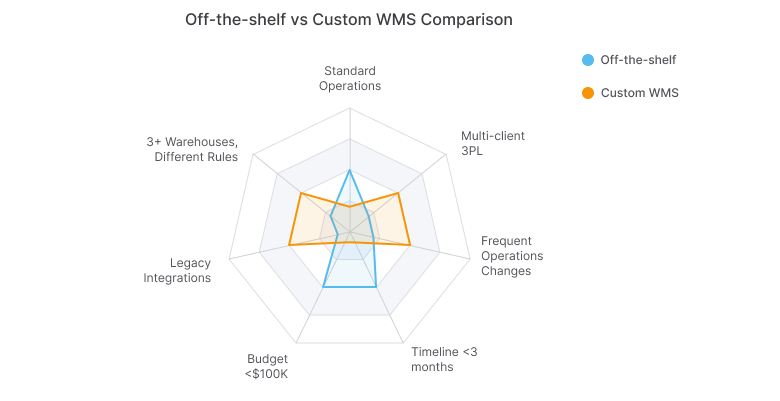
If you are deciding between packaged software and a custom warehouse management system, compare the operation against a decision matrix instead of relying on product demos or vendor confidence.
Decision Matrix
| Criterion | Off-the-Shelf | Custom |
|---|---|---|
| Standard picking and shipping flows | Strong fit | Usually unnecessary |
| Three or more warehouses with different rules | Often limited | Strong fit |
| Complex legacy integrations | Often difficult | Strong fit |
| Budget under $100K | Strong fit | Weak fit |
| Timeline under 3 months | Strong fit | Weak fit |
| Operations change frequently | Can become restrictive | Strong fit |
| Multi-client 3PL billing and SLA logic | Often partial fit | Strong fit |
| No long-term tech ownership capacity | Strong fit | Weak fit |
Questions to Ask Before Deciding
- The most direct test: can an off-the-shelf system handle the top five operational pain points through configuration, without custom code or workarounds?
- Cost over five years matters more than year-one price. Vendor licensing, implementation, support, and change requests compound.
- Ownership after go-live is a question few teams ask early enough. Who maintains the system, funds enhancements, and handles edge cases once the vendor is no longer involved?
- Day-one integration requirements deserve a separate list from later-phase ones. A system that depends on manual bridges to function is not integrated — it is deferred.
Why the Right Technology Partner Matters for Custom WMS
Custom WMS development is a long-term delivery commitment.
Most partner failures follow one of two patterns: the team understands software delivery but not warehouse operations, or they understand the domain but cannot maintain delivery discipline through a multi-phase project.
A capable partner covers both: warehouse operations knowledge and structured delivery through discovery, phased rollout, scope control, and production stabilization.
TwinCore builds on a .NET stack with logistics domain experience, covering the full delivery arc from operations audit to production deployment: understand the workflow, design for the real constraints, ship in controlled phases, and support the product after launch.
Final Thoughts
Most warehouses that end up building a custom WMS did not start out planning to. They started with a packaged system, hit structural exceptions it could not handle through configuration, and switched after the workaround cost became clear. Running the five-exception test before signing a vendor contract is the fastest way to avoid that path.