LinkedIn
 Twitter
 Facebook
 Youtube



A logistics team handling 10–15 shipments a day can make email, spreadsheets, carrier phone calls, and a basic Transportation Management System work. Rate quotes get requested, responses come in, someone picks a carrier, and a shipment goes out. It’s manual, but it functions.
Scale that to 50–100 shipments daily, and the model breaks. Dispatchers spend hours comparing rates across multiple carriers. Invoice amounts don’t match quoted rates. A customer asks for a delivery update, and answering requires a call to the carrier. Delivery windows — especially at retail customers with strict receiving schedules — get missed because nobody caught a delay until it was too late.
That’s when a transportation management system enters the conversation — usually not as a considered evaluation, but as a response to something that recently broke.
What Is a TMS?
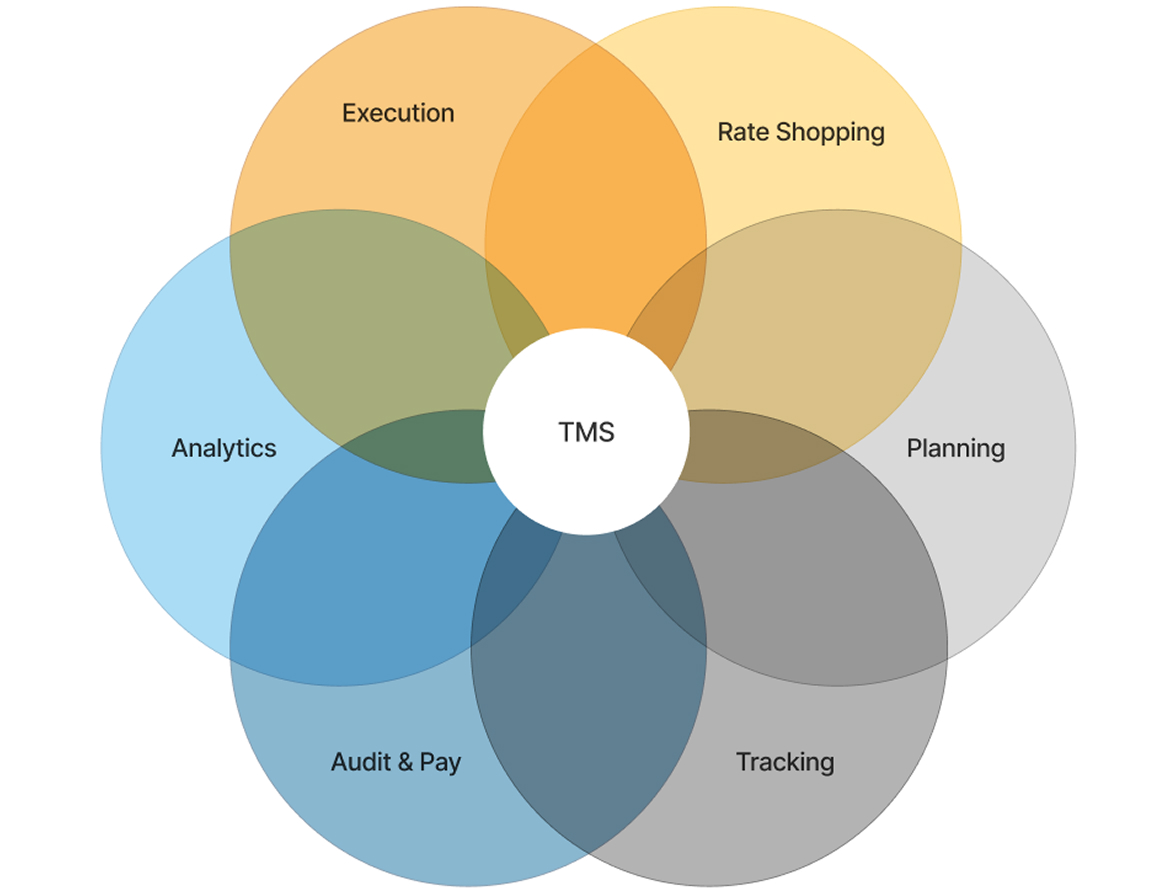
A transportation management system (TMS) is software that manages the planning, execution, and optimization of freight movement. It handles the core logistics functions: selecting carriers, booking shipments, tracking deliveries, reconciling invoices, and generating performance data.
Six functional domains:
- Plan — consolidate shipments, optimize loads, determine routing
- Rate & shop — pull real-time rates from multiple carriers and select based on cost, transit time, or service level
- Execute — generate load tenders, BOLs, and shipping documentation
- Track — monitor shipment status across carriers in a single interface
- Audit & pay — match carrier invoices against quoted rates, flag discrepancies
- Analyze — report on freight costs, carrier performance, and delivery KPIs
Two adjacent systems get confused with TMS regularly enough to address directly. A fleet management system (FMS) manages owned vehicles — driver schedules, maintenance, fuel, compliance. A warehouse management system (WMS) manages inventory movement inside a facility. A TMS manages freight movement between those facilities and customers. Each covers a distinct domain; they share data but don’t substitute for each other.
How a TMS Works: The Integration Layer
A TMS without ERP or OMS connectivity handles carrier booking and tracking. That’s useful, but it’s the minimum of what the software can do.
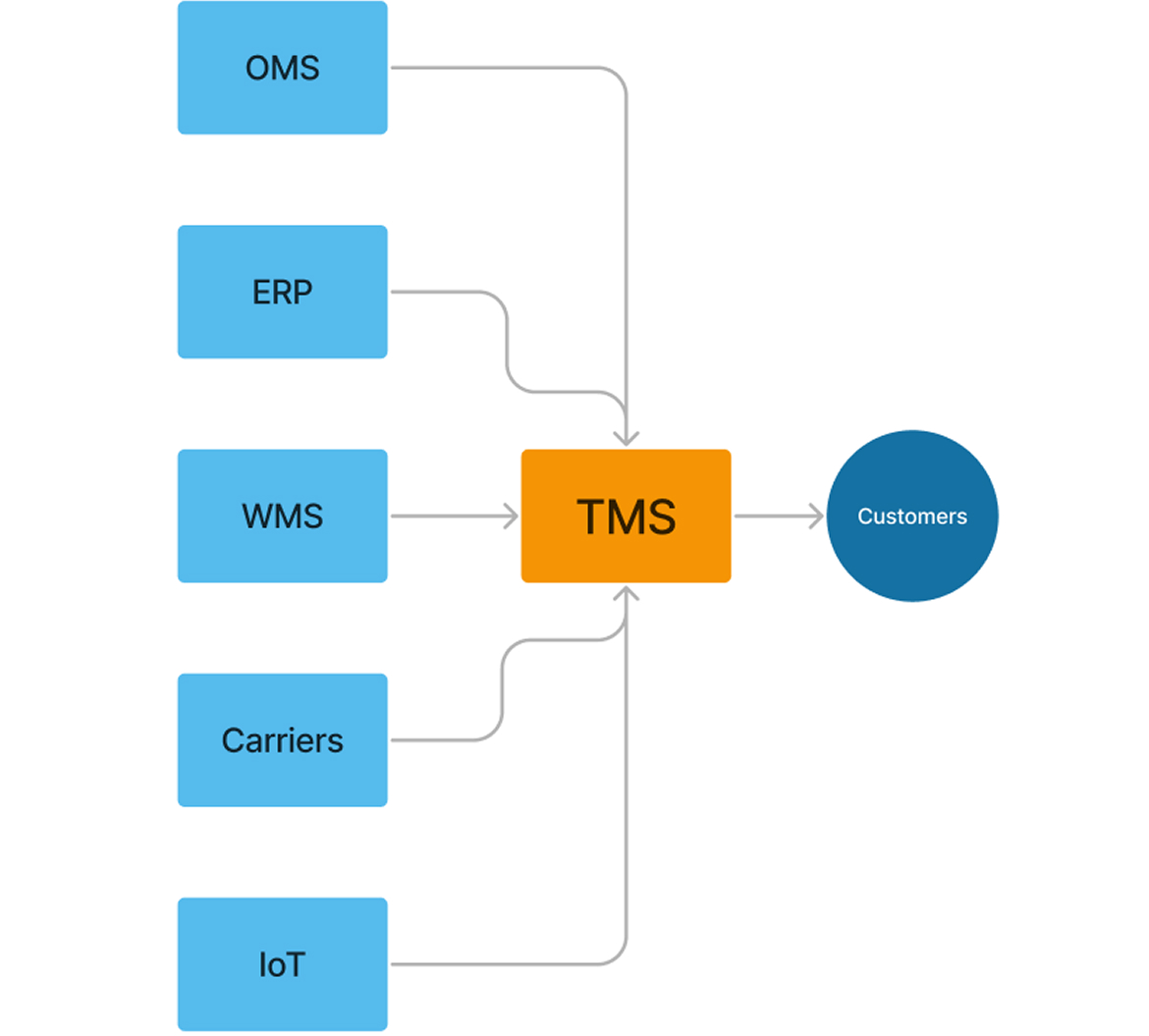
The full process flow:
- Order intake — order data arrives from an OMS or ERP, triggering freight planning
- Load planning and carrier selection — the TMS consolidates orders into loads, runs carrier rate comparisons, and selects based on configured criteria
- Execution and documentation — tenders go to carriers, shipping documents generate automatically
- Real-time tracking — status updates flow in from carrier EDI feeds, APIs, and telematics
- Freight audit — incoming invoices are matched against contracted rates; exceptions flagged for review
- Analytics — freight spend, carrier on-time rates, and cost-per-lane data feed into reporting dashboards
What each integration point contributes:
- ERP — provides financial coding for shipments, receives freight costs for invoice posting
- WMS — confirms warehouse readiness before a shipment is tendered, receives confirmation when goods leave
- OMS — passes order details, receives status updates and ETAs to share with customers
- Carrier systems — EDI 204 (load tender), 210 (invoice), 214 (status update), plus direct API integrations for carriers that support them
- Telematics and IoT — GPS tracking and sensor data for temperature-sensitive or high-value cargo
A TMS connected only to carrier feeds gives you a status dashboard. The freight cost control and decision data comes from ERP and OMS integration — that’s where decisions with real cost impact get made.
Who Needs a TMS and When
Shipment volume is the metric most people start with, but the more direct question is where the manual process is already breaking down.
Signals that the current approach is hitting its ceiling:
- Dispatchers spend 2+ hours daily on carrier selection and rate comparison
- Freight invoices regularly differ from quoted rates; reconciliation takes days and still misses things
- Giving a customer an accurate ETA requires calling the carrier
- Delivery windows are missed because exceptions surface too late to act on
- No consolidated view of freight costs — reporting means pulling from spreadsheets and inboxes
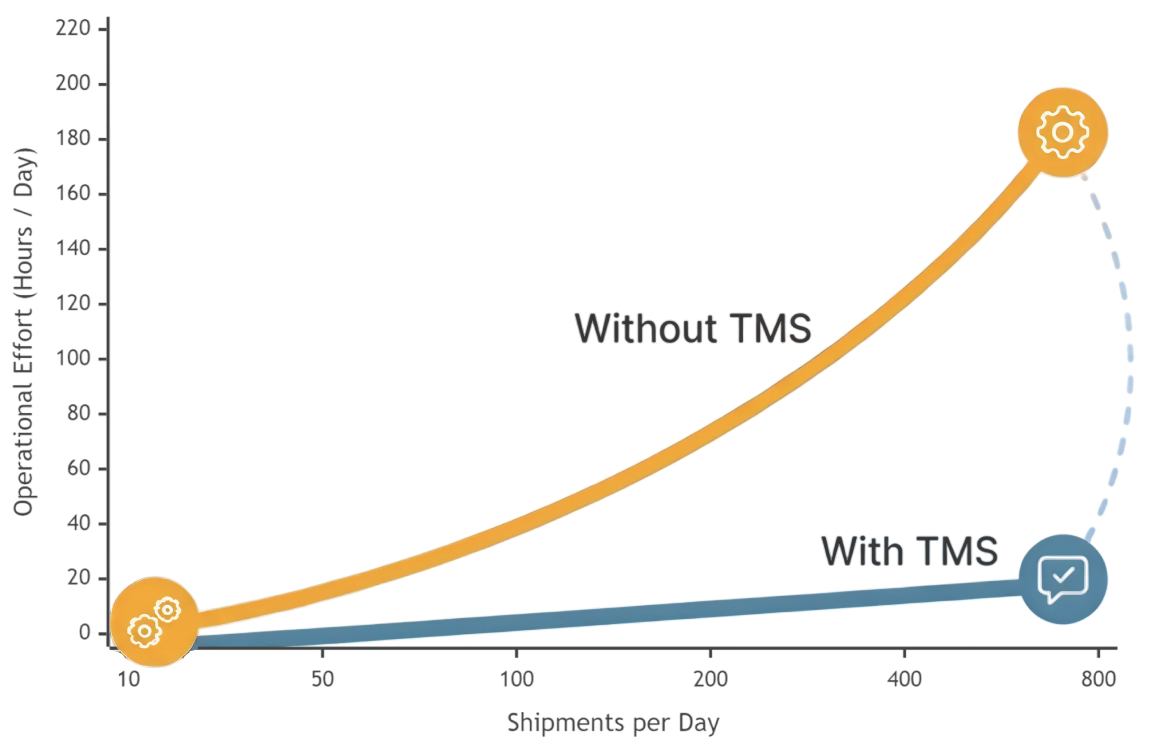
The last signal is the clearest: the only way to handle more freight is to hire more people. Volume grows, headcount grows with it — there’s no leverage in the model.
When a TMS is justified
50+ shipments per month (lower if the operation involves multimodal or cross-border freight), three or more carriers in regular rotation, delivery windows that carry penalties or customer risk, and existing or planned ERP/WMS connectivity.
Where it’s premature: a small number of shipments with a single fixed carrier, straightforward domestic single-mode shipping, dispatch workload under an hour a day, and no ERP or WMS in place to integrate with. Adding a TMS at that stage creates implementation overhead without the volume to justify it.
The practical trigger is usually simpler: the same problems keep appearing, someone puts a number on them, and the manual approach stops being defensible.
Benefits of a Transportation Management System
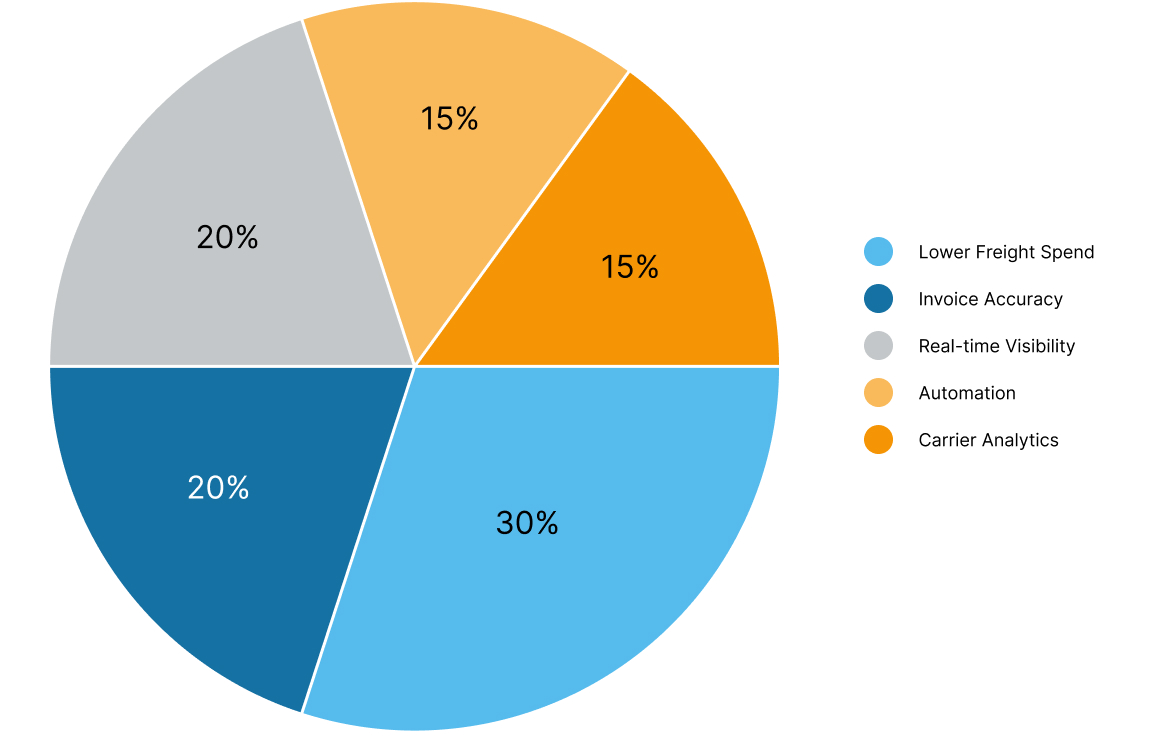
The impact is most visible in two places: what freight actually costs, and how many people it takes to move it.
- Lower freight spend — rate shopping runs automatically at booking across all carriers. The savings compound across hundreds of shipments; no dispatcher needs a spare hour to find them.
- Invoice accuracy — freight audit flags every gap between quoted and invoiced rates. Manual reconciliation misses 3–8% of invoiced charges; systematic audit catches them before they post.
- Shipment visibility without phone calls — status across all carriers feeds into one interface. Customer ETAs come from the system, not from calling the carrier.
- Fewer missed delivery windows — exception alerts flag delays early enough to reroute or notify the customer. Retail chargebacks and SLA penalties drop when the team knows about a problem before the customer does.
- Automated documentation — BOLs, load tenders, and customs paperwork generate from order data. Manual entry errors disappear; so does the time spent producing them.
- Carrier accountability — on-time rates, damage claims, and cost-per-lane data build per carrier over time. Contract negotiations start from facts, not gut feel.
- Headcount leverage — dispatchers shift from managing every shipment to managing exceptions. Volume grows; the operations team size doesn’t have to.
- Compliance built into dispatch — for hazmat, temperature-controlled, or cross-border cargo, documentation and routing requirements are encoded in the workflow rather than checked manually after the fact.
Most of the return comes from two things: catching freight costs the current process leaks, and handling more volume without adding people to handle it.
Deployment Models: SaaS, On-Premise, Custom TMS
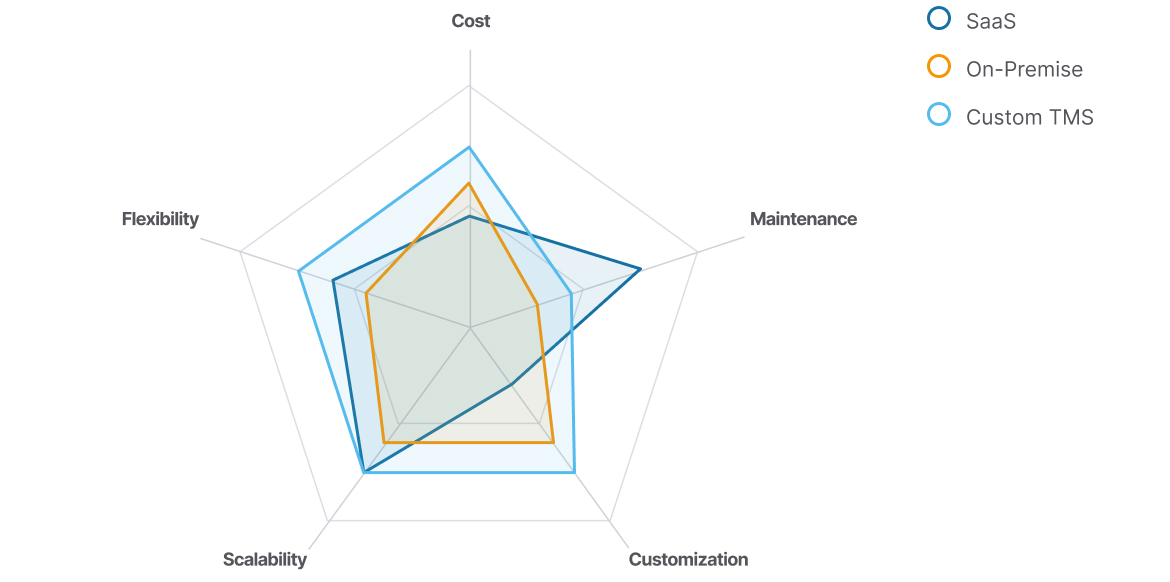
Transportation management systems come in three deployment models, and the choice affects cost structure over time more than it affects day-to-day functionality.
SaaS TMS
SaaS TMS covers most standard use cases: fast onboarding, subscription pricing, automatic updates, and pre-built carrier integrations. For mid-size operations with conventional workflows, it’s the right place to start. At scale, per-unit pricing grows with volume, customization is constrained by the vendor’s roadmap, and data sits on external servers.
On-premise licensed TMS
On-premise licensed TMS gives direct control over data and infrastructure, at the cost of carrying your own IT overhead — maintenance, updates, and security patches require internal resources. Most new enterprise deployments go either SaaS or custom cloud.
Custom TMS
Custom TMS is built to the specific business processes of the operator and deployed in the cloud — Azure, AWS, or similar. Custom doesn’t mean on-premise; a purpose-built system runs as a managed cloud application with the same availability as any SaaS product, without the subscription ceiling or vendor roadmap constraints. The initial investment is higher. The return is the absence of per-unit licensing fees, full control over integrations and feature development, and a system built around how the operation actually runs, not configured to approximate it.
Cost drivers across models: SaaS pricing scales with usage — per-load fees (typically $1–$4/shipment), per-user licensing, and per-carrier connection fees. At low-to-medium volume, the model is predictable and proportional. At 300–500+ shipments per month across multiple carriers, that per-unit pricing adds up fast. On-premise adds server infrastructure, internal staff for maintenance and security patches, and version upgrade overhead. Custom development carries a higher upfront investment but eliminates per-unit fees entirely — for high-volume operations, the economics typically favor custom within three to four years of deployment.
When SaaS Is Not Enough: The Case for Custom TMS
Most companies that need a transportation management system should start with SaaS. Faster to deploy, lower upfront cost, and for standard operations, it covers the baseline. The custom question comes later — usually when you’re paying a substantial monthly subscription and still running spreadsheets on the side to handle the parts the product doesn’t.
The economics tend to surface first. SaaS TMS pricing scales with shipment volume, user count, and connected carriers. At moderate volume, that’s predictable and fair. Push past 300–400 shipments per month across multiple carriers and the per-unit math changes — and unlike a subscription you can cancel, a custom system stops costing per transaction once it’s built.
Workflow gaps vary by operation, which makes them harder to characterize. SaaS products are designed for the median logistics workflow. If yours involves hazmat documentation, non-standard carrier rate structures, multi-stop compliance routing, or temperature conditions that need to be logged against regulatory thresholds, you end up configuring workarounds rather than using features. At some point the workarounds cost more than a system that just handles the thing directly.
Integration is where the vendor’s architecture shows up as your problem. Connecting a SaaS TMS to an ERP, a WMS, a customer portal, and IoT sensor feeds typically means going through middleware the vendor controls — or paying for it as an add-on. For regulated industries, there’s also the question of where data physically lives. Pharma and cross-border food logistics companies face compliance requirements that can outright prevent data from sitting on a SaaS vendor’s servers. That ends the evaluation; it’s not a configuration issue.
The longer-term constraint is roadmap control. Whatever the product doesn’t do today, you’re waiting on the vendor to prioritize it — competing against every other customer on the request list. For companies where logistics execution is a meaningful part of how they compete, that dependency adds up quietly.
You don’t have to commit to a full build upfront. Start with SaaS to get baseline processes off spreadsheets. Track where it creates friction or recurring cost overruns. Add custom modules at the gaps that matter most. The case for a full transition becomes clear once you can point to exactly what you’d replace and why.
A custom system also sits on the balance sheet as an asset — a real number for companies approaching M&A or outside investment. TwinCore builds custom TMS solutions for operations at this stage of the decision.
Operational Scenarios
Scenario 1: Distributor with growing shipment volume
A distributor of consumer goods moves 80–150 shipments per week across 5–8 carriers to retail chains with strict receiving windows. Rate quotes are collected manually across email threads, dispatch planning runs in a shared spreadsheet, and invoice reconciliation takes the finance team two or three days at month-end.
The damage accumulates: overcharges pile up because discrepancies aren’t caught at booking, missed receiving windows trigger retail chargebacks, and the dispatcher becomes the bottleneck whenever volume spikes. The team is competent — the process just doesn’t have slack in it.
With a TMS: centralized rate shopping at booking, automated load tendering, systematic freight audit against contracted rates, and ETA updates flowing automatically to customer-facing systems. The dispatcher stops managing every individual shipment and starts managing exceptions.
Scenario 2: Third-party logistics operator
A 3PL handling 200+ shipments daily across 15–20 carriers — LTL and FTL mix — needs to provide each client with real-time visibility, per-client freight cost allocation, and carrier performance reporting. Clients expect tracking portals. Their own ERP and WMS environments need integration.
At this scale, the TMS isn’t a tool layered on top of how the business runs — it is how the business runs. Carrier scorecards, per-client cost reporting, multi-client ERP and WMS integrations, configurable customer portals. Without it, every new client means hiring more people to manage them. The operation doesn’t scale, it just gets bigger.
Scenario 3: Specialized freight where SaaS runs out of road
A pharma or industrial chemicals operation manages temperature-controlled and hazmat shipments with regional compliance requirements and non-standard carrier rate structures. The current SaaS TMS doesn’t ingest sensor data from trailer IoT devices, can’t encode compliance logic for cross-border hazmat routing, and sells ERP integration as a separate module.
For an operation like this, custom logistics software isn’t a preference — it's the only path that handles the actual requirements: proprietary rate calculation logic, IoT integration for in-transit condition monitoring, compliance workflows built into dispatch, and direct ERP connectivity without middleware. Custom development builds those in from the start, rather than trying to configure a generic product into something it wasn't designed to be.
Getting the Decision Right
Most companies don’t go looking for a TMS — something breaks, and the conversation becomes unavoidable. The path typically starts with SaaS and moves toward custom from there, as the cost of the gaps between the product and the actual operation becomes measurable.
The companies that end up with systems that fit their operation — rather than systems they’ve learned to work around — are usually the ones that ran SaaS long enough to know exactly where it wasn’t cutting it. That’s the starting point — whether it means adding modules to what’s already in place or starting from a clean design.