
 LinkedIn
 Twitter
 Facebook
 Youtube

For a New Jersey manufacturer, TwinCore rebuilt a legacy .NET warehouse app into a custom warehouse management system (WMS) on Angular and .NET. The same web app runs on handheld scanners and on desktop.
- 1 frontend developer
- 2 backend developers
- 1 designer
About the client
A New Jersey manufacturer that makes and distributes its own goods, holding lot-tracked, expiry-dated stock. The warehouse ran on an older in-house WMS, a legacy .NET application that had grown hard to change.
“Igor and the TwinCore team delivered higher quality than we expected, and the new system is more reliable than the one it replaced.”
Project Goal
The legacy .NET application ran on an outdated framework version and carried known bugs. The client wanted it modernized incrementally, without stopping the warehouse.
- Migrate the application to a newer .NET version
- Add the warehouse capabilities the legacy app lacked, including FEFO picking, expiry control, replenishment, and cycle counting
- Fix the bugs already affecting the running system
- Improve integration with the existing inventory services, syncing a defined subset of data rather than every field
- Improve the deployment process
- Make errors easier to find in the logs
- Strengthen the audit trail


Before vs after
| Workflow | Before | After |
|---|---|---|
| Platform & stack | Legacy .NET application, desktop-only, slow to change | Angular front end on a rebuilt .NET back end, handheld and desktop clients |
| Picking lot selection | Operator chose any available lot; oldest stock left to expire | FEFO mode routes every pick to the earliest-expiry lot, ranked #1, #2 per SKU |
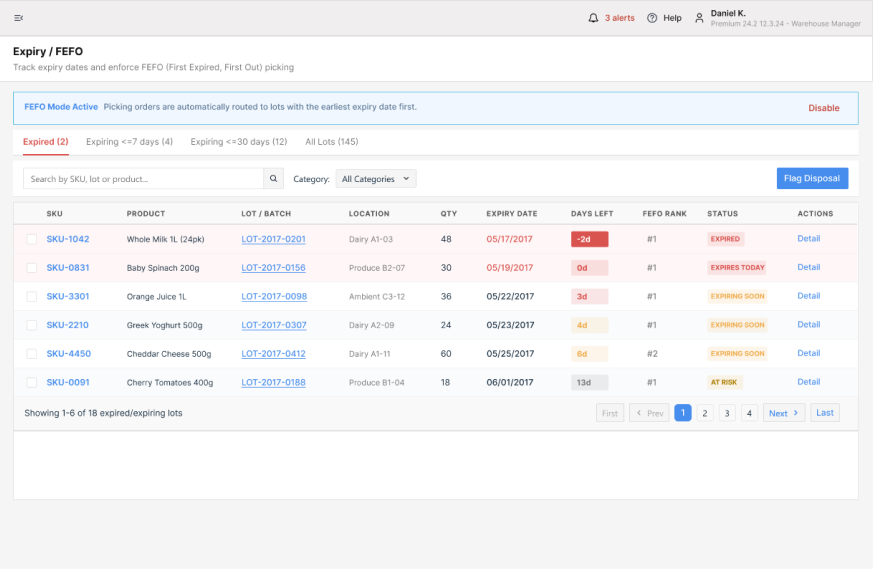
| Expiry control | Periodic manual sweep, write-offs found at stock count | Live Expiry/FEFO watch list with expired, ≤7 days, and ≤30 days buckets plus a flag-for-disposal action |
| Receiving | Paper/spreadsheet check-in against the PO, variances found later | Dock-scheduled receipts with expected-vs-received counts, QC hold on flagged pallets, barcode scan check-in |
| Replenishment | Reorder triggered by someone noticing a gap | Auto-suggested order qty vs min-stock threshold, supplier and lead days pre-filled, critical/low status |
| Stock counts | Full-warehouse counts, line disrupted | Area- and category-scoped cycle-count plans with variance tracking, run in parallel with operations |
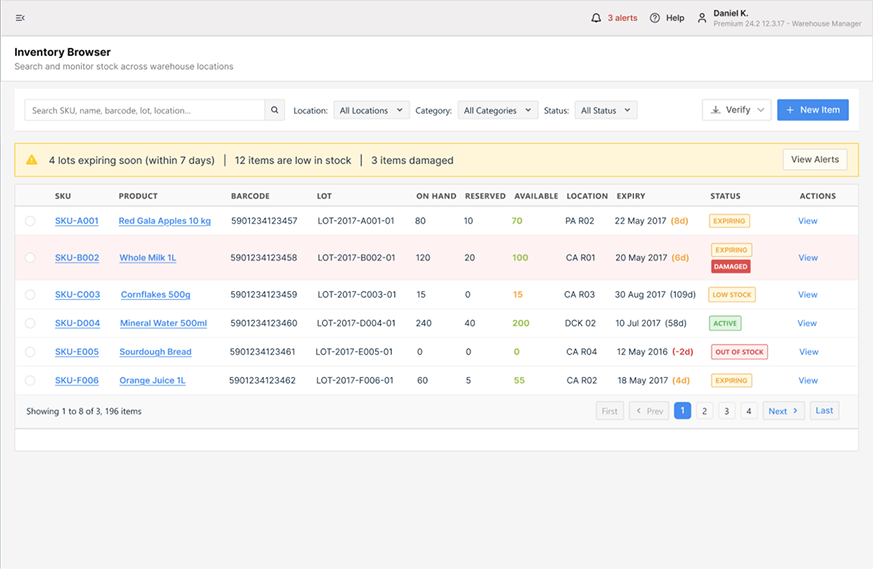
| Inventory visibility | On-hand only, no reservation or location detail | On-hand / reserved / available split per SKU, down to bin and lot |
Problem complexity
A generic WMS or ERP module counts how much of a SKU is on hand, not which lot it is or when it expires. This system had to track every lot by its expiry date and its exact bin. FEFO picking ranks those lots by date and blocks the wrong one. Lot-at-location tracking turns a few hundred SKUs into thousands of rows. All of it still has to stay correct on a handheld scanner a picker uses for seconds at a time.
The warehouse could not stop running. That ruled out both a big-bang rebuild and a packaged WMS rollout. Generic tools skip perishables, or they carry a six-figure price tag. None can migrate a live system without downtime.
Solution
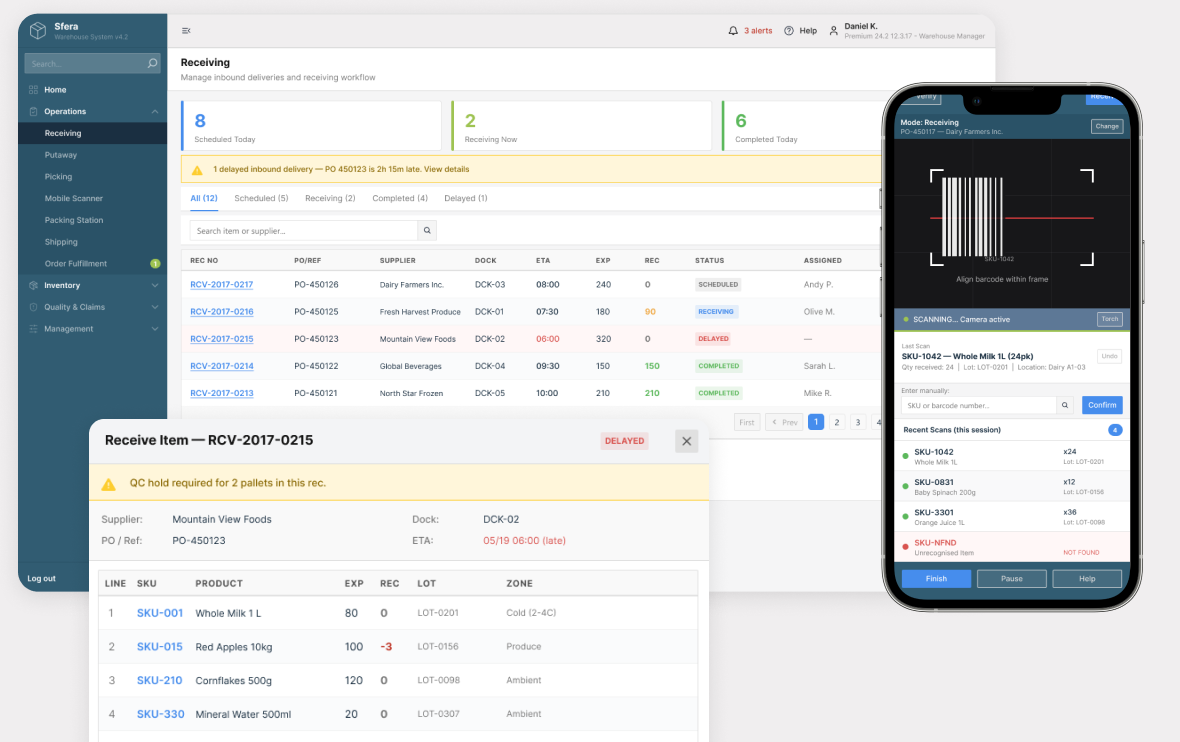
TwinCore replaced the legacy .NET application with an Angular front end and a rebuilt .NET API. The team then grew it into one WMS covering receiving through dispatch. One web app runs on desktop for managers and on handheld scanners for the floor, through the scanner's browser. No separate mobile app to maintain.
The WMS connects to the client's existing inventory management system. The IMS stays the system of record. Master data and stock balances match on both sides throughout the migration. Inside the WMS, the core record is the lot at a location. Every receipt, putaway, pick, and count moves stock between lots and bins. Each move writes to the audit trail.
- Receiving: schedule dock doors, check expected against received per PO line, flag late deliveries, and hold flagged pallets for QC before they become pickable.
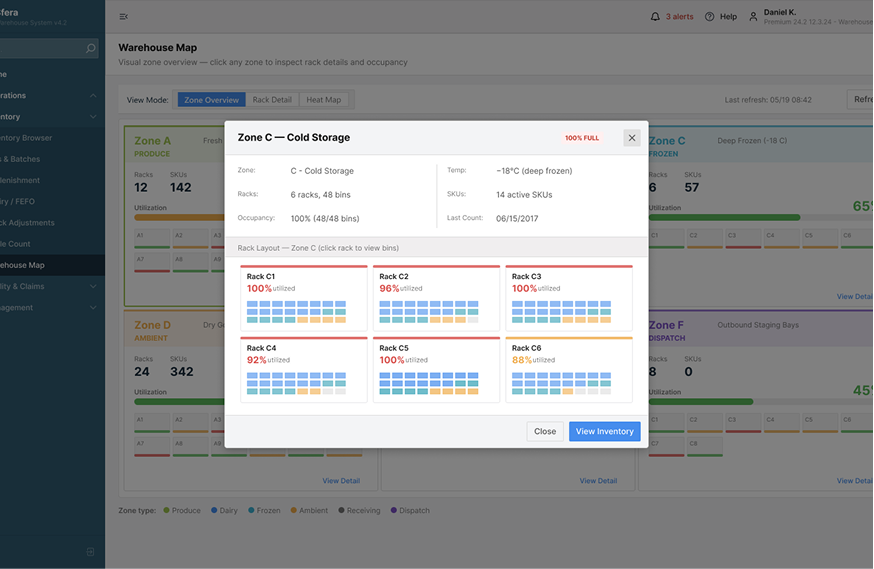
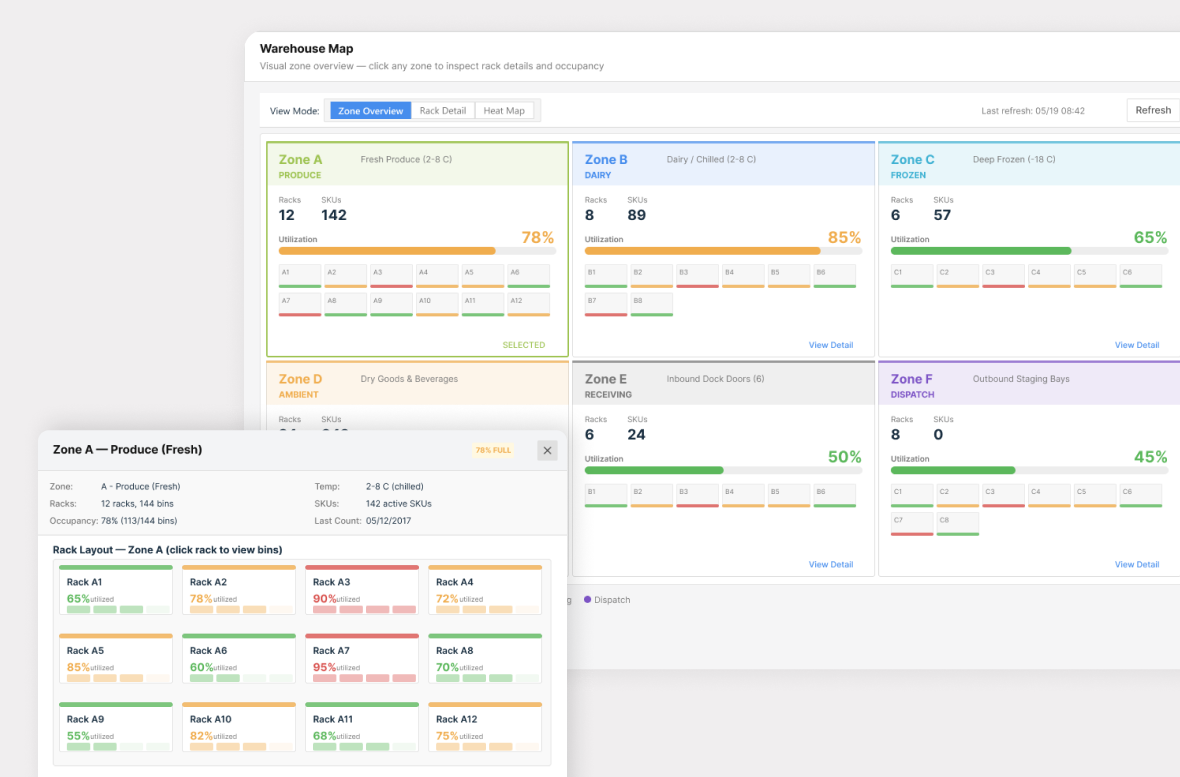
- Putaway and warehouse map: stock stored to a specific bin, with a heat map of rack and bin occupancy so slotting uses real capacity, not a guess.
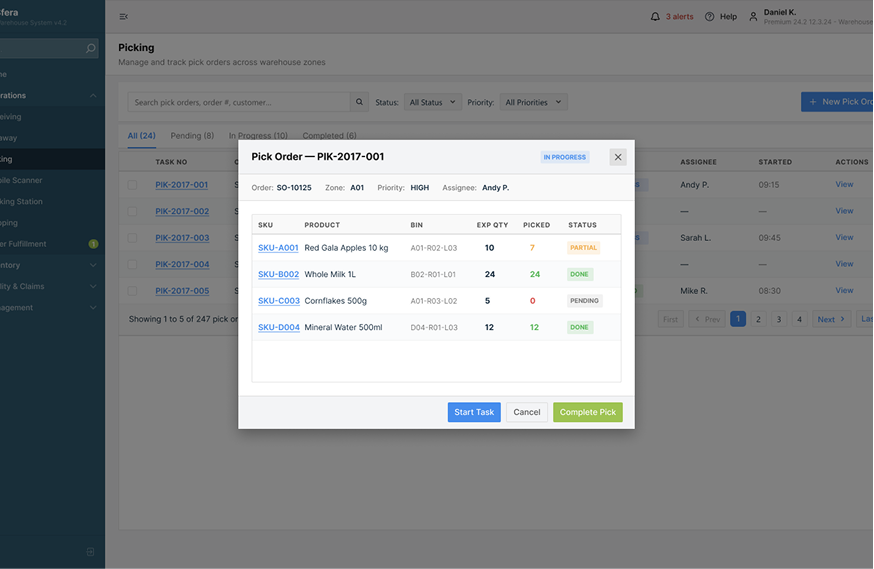
- Picking: bin- and lot-directed pick orders, with partial-pick tracking and a per-line status (pending / partial / done).
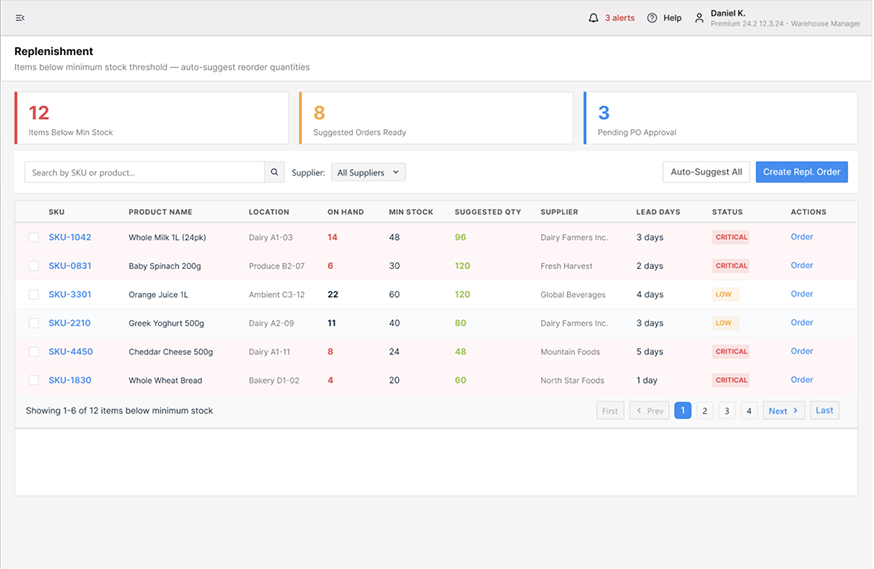
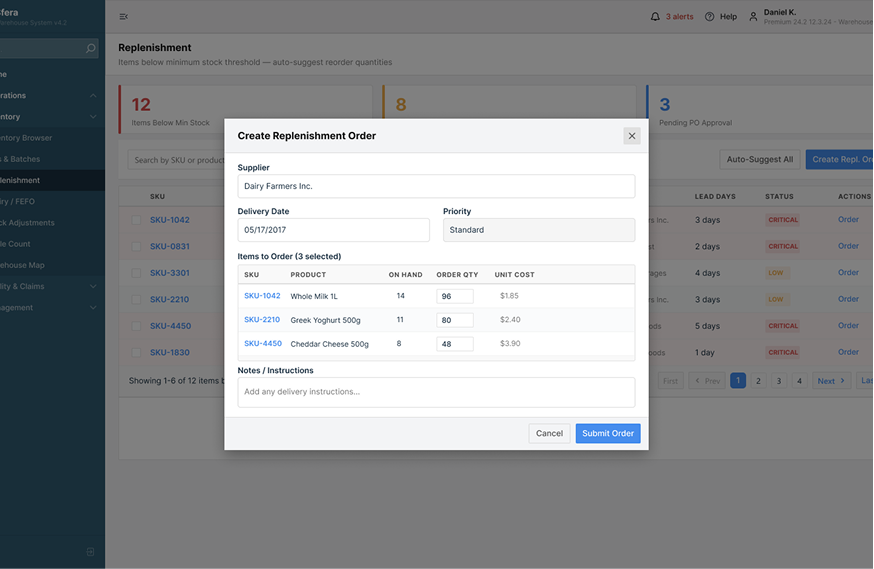
- Replenishment: watches min-stock levels, suggests a reorder quantity, attaches supplier and lead days, and routes a PO for approval.
- Expiry / FEFO: a live watch list groups lots by days to expiry and adds a flag-for-disposal action, with FEFO wired into the picking engine so the earliest-expiry lot is picked first.
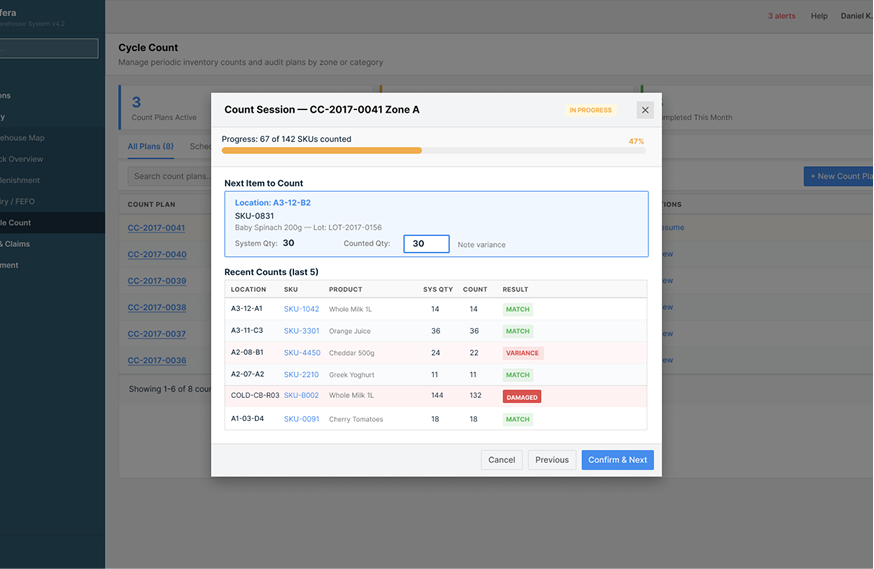
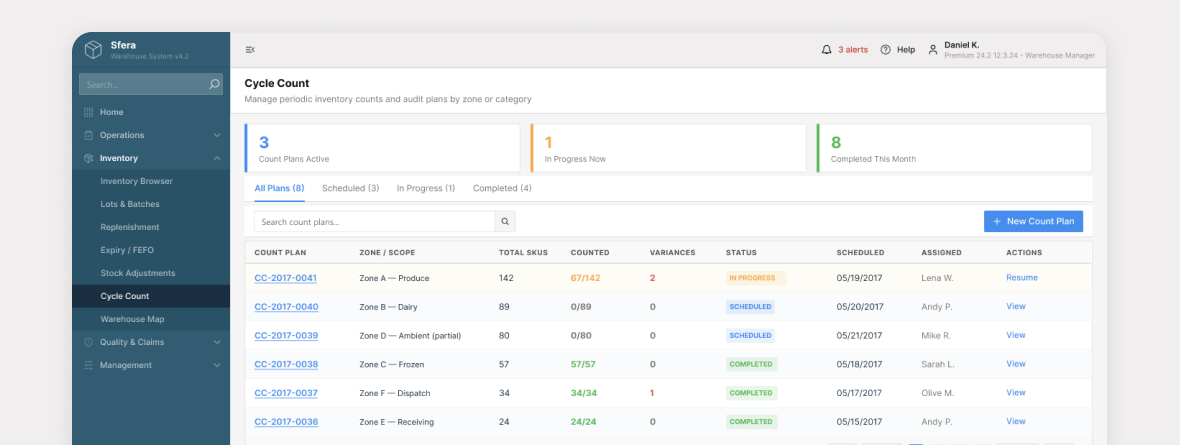
- Cycle count: count plans scoped to one area or category, run without stopping the warehouse.
- Handheld scanner mode: the same web app, sized for the scanner's small screen. Barcode receiving and picking, manual SKU entry as a fallback, an explicit NOT FOUND state for unknown items, and a per-session scan log.
- Inventory management system integration: a sync layer to the existing IMS that keeps SKUs, stock, and movements matched across both systems, instead of one hard cut-over.
- Performance characteristics: the inventory ledger can be queried by SKU, barcode, lot, or location. Availability is on-hand minus reserved, so pickers and managers see the same number with no batch refresh.
One tradeoff we made: TwinCore kept the client's inventory management system as the system of record and built the WMS to integrate with it, instead of replacing it. The cost was living with the IMS data model and a sync boundary instead of one clean schema. The gain was a module-by-module migration with no high-risk big-bang cut-over.
Another tradeoff: FEFO is opt-in per warehouse, toggled on the Expiry/FEFO screen, not hard-coded. A fully rigid FEFO would block real exceptions, like a customer-specified lot or a damaged earliest lot. Making it a switch the manager can turn off keeps the floor moving when the rule does not fit the situation.
Architecture / UI
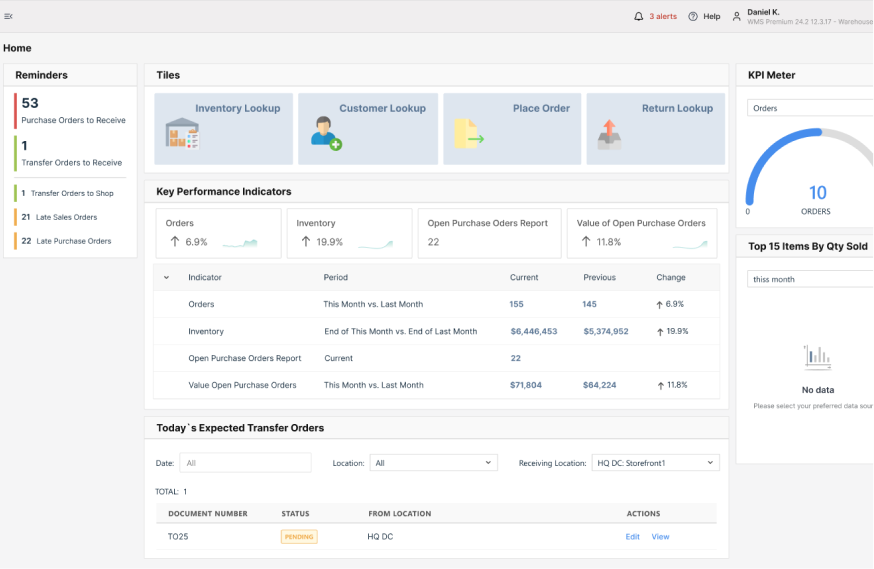
The system flow runs Angular SPA (handheld scanner & manager console) → .NET API → WMS domain services (receiving, putaway, picking, replenishment, FEFO, counting) → lot-at-location inventory ledger ↔ integration/sync layer to the client's existing inventory management system → reporting/dashboard.
The warehouse map shows rack and bin occupancy and utilization at a glance.
The Expiry / FEFO watch list drives both disposal decisions and pick routing.
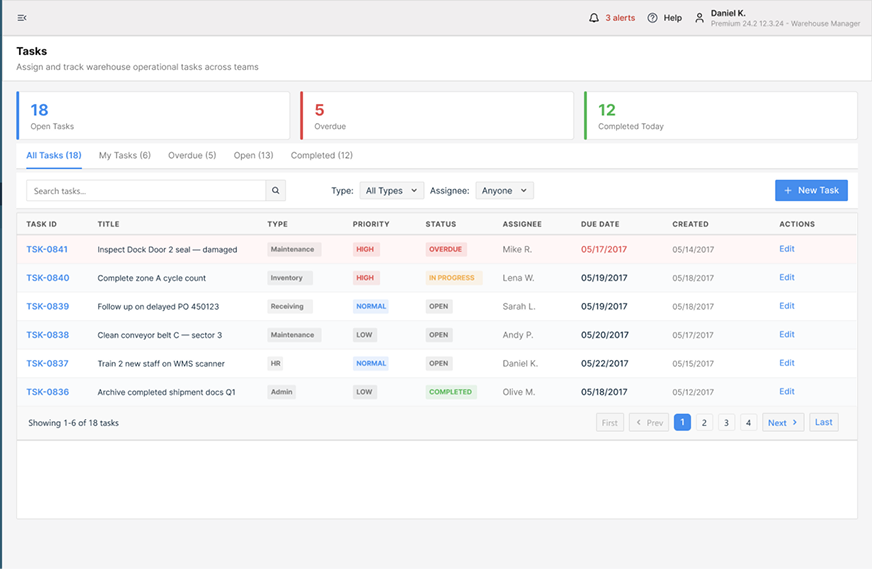
The screenshots show a demonstration build with a synthetic test dataset (sample SKUs, suppliers, and lot numbers). The client's real production data cannot be shown under NDA. The interface, modules, and workflows are the delivered product; only the records are placeholder values.
Technologies used
Why TwinCore
The client had already weighed the obvious alternatives. Staying on the legacy .NET app meant spending more on a codebase that fought every change and still couldn't enforce FEFO or track stock to the lot. A packaged WMS would have meant a licence plus a configuration project sized for a retail chain, and a forced rip-out of the inventory management system the business runs on.
TwinCore ran the .NET modernization and the new WMS features through one team, so they shipped together instead of as two separate projects. The team had already built lot- and location-tracked operational systems in logistics (see the load board for the logistics industry). Scoping the build module by module, with integration to the existing IMS, put working receiving and inventory in front of the floor early, not after a full rebuild.
Results in numbers
- FEFO routing covers every active lot, so the earliest-expiry stock is always the next pick
- Expiry exposure surfaced in three live buckets (expired, ≤7 days, ≤30 days) with a disposal-flag action, replacing periodic manual sweeps
- Every SKU now carries three live quantities (on-hand, reserved, available) down to bin and lot, versus a single number before
- Replenishment surfaces every below-minimum SKU with a suggested order quantity and supplier lead days pre-attached
- Cycle counts run area-scoped, one area or category per plan, without stopping the warehouse
- Receiving reconciles expected vs received per PO line with QC hold, catching short and late deliveries at the dock
Ready to optimize your warehouse?
If you run a warehouse where stock carries lot numbers and expiry dates, and a generic inventory tool is costing you write-offs or mis-picks, this is the build that fixes it.
Book a 30-minute architecture call. We'll map your bins, lots, and pick flow and give you a module-by-module build plan with a ballpark cost on the call.
Not ready to talk yet? Ask us for the WMS readiness checklist — the receiving, FEFO, slotting, and counting questions to answer before scoping a custom WMS.
